Evidence note
Evidence note: This article is researched from manufacturer instructions and safety references. Before You Drill has not performed product testing or jobsite verification for this guide.
Short answer
If your stud finder beeps everywhere, changes from one pass to the next, or gives a warning near the planned hole, do not treat the reading as permission to drill. Re-scan according to your model’s instructions, then check the wall type and room context. A reading may be a clue, but it does not identify a hidden object or clear hidden services.
Three readings that mean stop and reassess
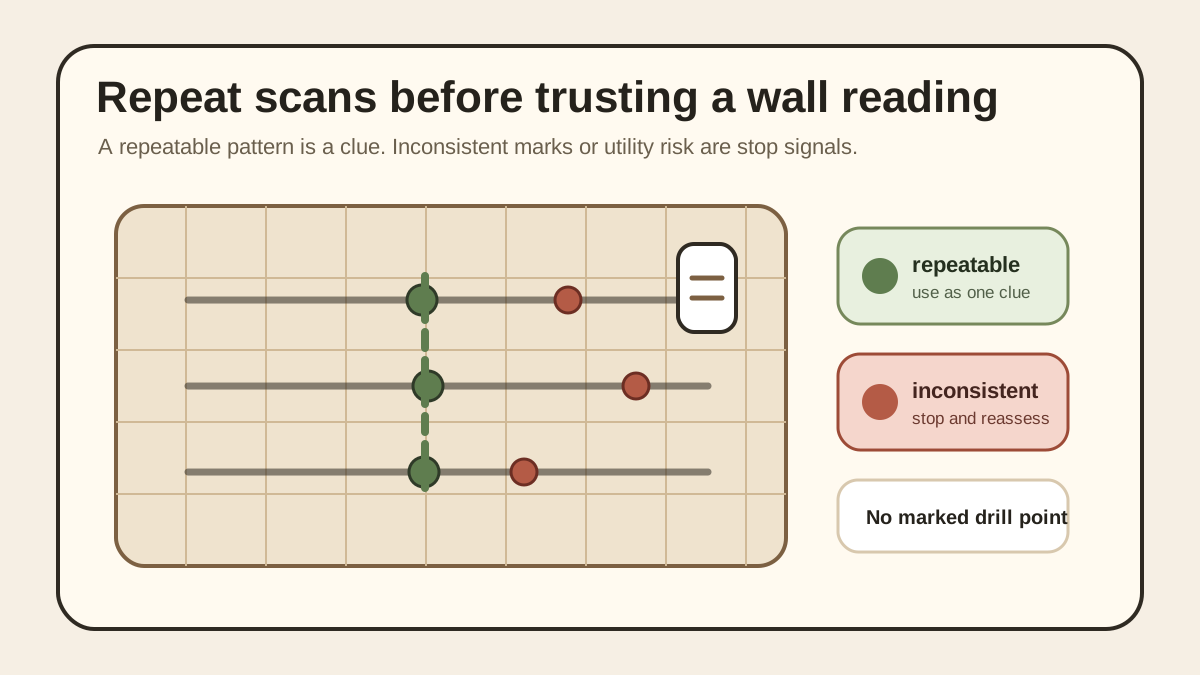
The mark does not repeat when you scan again as your model instructs.
The tool alerts across a broad area or shows a metal, live-wire, pipe, or unknown-object warning that your model specifically provides.
The wall is unknown, wet, damaged, layered, tiled, plaster, or masonry, or the object would have serious consequences if it fell.
What a stud finder can and cannot approve
A stud finder can help you find clues inside a wall. It cannot approve a drilling location by itself. Many tools respond to density changes, metal, or other hidden features, depending on the model and scan mode. A light, bar, or beep may point toward a stud, but it may also reflect another material, a wall layer, an object the tool cannot identify, or a scan condition that does not match the instructions.
Use the tool to slow the decision down, not speed it up. A good scan should make the wall more understandable. If the scan creates new confusion, the answer is not `drill anyway`. The answer is to stop, re-scan according to the model instructions, check the room context, and decide whether the job needs help.
Why false positives happen
Confusing readings can happen when the wall surface is uneven, the tool is miscalibrated, the battery is weak, the operator is not following the scan instructions, or the wall contains material the tool cannot identify. Some tools may react to density changes without telling you what the hidden object is. That matters because a hidden pipe, wire, metal plate, or inconsistent patch is not the same as a safe wood stud.
The tool may also behave differently on plaster, lath, tile, masonry, textured surfaces, or layered repairs. If your wall is not simple painted drywall, expect more uncertainty and read your model's instructions before trusting the scan.
Start with the wall and room before scanning
Before scanning, look at the room. Are you near an outlet, switch, bathroom, kitchen, laundry area, utility wall, fireplace, exterior wall, or old patch? Is the wall damp, soft, stained, cracked, crumbling, or repeatedly repaired? Are you trying to hang something heavy, overhead, child-adjacent, or above a bed or walkway?
Those questions matter before the first beep. A stud finder should not be used to override obvious context. If the room suggests hidden wiring, plumbing, gas, or moisture risk, the scan should be treated as a caution layer, not a green light.
How to map the wall without overtrusting the tool
Scan slowly and follow the specific instructions for your model. Use a fresh battery if the manufacturer recommends it. Keep the tool flat to the wall, use the scan mode the instructions call for, and mark light pencil points instead of drilling from the first indication.
Mark light pencil or tape points and look for a repeatable pattern. A result that repeats is more useful than one isolated beep, but it is still not final approval.
Scan from left to right and right to left. Mark both edges if the tool provides edge readings. Move up or down and scan again. A useful result should be repeatable and should line up with a likely vertical path. If one mark appears only once, shifts wildly, or contradicts the rest of the wall, treat it as unresolved.
Warning signs that the beep is not enough
Do not trust the beep if the tool flashes or beeps continuously, if the reading appears everywhere, if the marked location does not repeat at another height, or if the reading appears only when you scan from one direction. Do not trust the beep if the wall type is unknown, if the object is heavy, or if the tool warning conflicts with what you expected.
Also slow down if every scan seems to find something. A wall full of alerts may mean the tool is reacting to material, metal, wiring, pipes, texture, calibration, or another condition. It does not mean every location is safe.
Live-wire, metal, pipe, and density alerts
Treat alerts as stop signals, not object identification. The tool may be reacting to something real without telling you whether it is a stud, metal, pipe, wire, wall layer, or another hidden condition.
Some tools include live-wire, metal, or deep-scan warnings. Treat those warnings conservatively. If the tool suggests possible wiring, metal, pipe, or another hidden object near the drilling area, stop and reassess. Absence of a warning is not proof that the wall is clear.
Never use a stud finder to give yourself final approval around electrical, plumbing, gas, or utility risk. Near outlets, switches, kitchens, bathrooms, laundry walls, or utility spaces, the safer move is to slow down and ask the right qualified person if the path is unclear.
Plaster, tile, textured, and layered walls
Stud finders can be less predictable on plaster, lath, tile, thick texture, masonry, or walls with multiple layers. Some manufacturer guidance warns that electronic stud finders may not be designed for lath and plaster unless the tool has the right scanning capability.
If the tool reading does not make sense, do not keep drilling small holes to investigate. Wall systems that confuse the tool can also confuse the fastener decision. Move back to wall-type identification and the pre-drill checklist.
Heavy objects: repeatable reading still may not be enough
Even a repeatable stud finder result may not be enough for TVs, cabinets, grab bars, heavy mirrors, overhead items, or objects above beds, desks, child areas, and walkways. For high-consequence objects, you need the object instructions, bracket instructions, wall type, support method, fastener method, and failure consequence to line up.
Do not let a tool beep turn a safety decision into a simple DIY job. The heavier or more consequential the object is, the more you should treat the stud finder as one clue among several.
Stop rules before drilling
Stop if readings are inconsistent, the tool gives live-wire, metal, pipe, or unknown-object warnings, the wall type is uncertain, the surface is wet or damaged, or the location is near electrical, plumbing, gas, or utility risk. Stop if the object is heavy, overhead, above a bed, in a child area, or in a walkway and the support method is not clearly verified.
Stop if you are tempted to drill because the tool beeped once. A single reading is not a safety plan.